Comenzi uzuale:Locatii/en: Diferență între versiuni
Tupi (Discuție | contribuții) |
Tupi (Discuție | contribuții) |
||
| Linia 25: | Linia 25: | ||
| − | + | În cazul în care selectaţi al doilea element din listă, o să vă fie afişată o listă cu toate sediile ale facţiunilor serverului.<br /> | |
| − | '' | + | ''Exemplu: 69 Pier Mobs HQ, Hitmen Agency HQ, Tow Truck Company HQ, National Guard HQ.''<br /> |
| − | [[File:locations3.png|300px| | + | [[File:locations3.png|300px|Sedii Facţiuni]] |
| Linia 34: | Linia 34: | ||
| − | + | În cazul în care selectaţi al patrulea element din listă, o să vă fie afişat un dialog în care va trebui să puneţi ID-ul businessului pe care doriţi să-l localizaţi.<br /> | |
<img src="https://i.postimg.cc/zXLR7Lq5/business-find.png" width="300px"><br /><br /> | <img src="https://i.postimg.cc/zXLR7Lq5/business-find.png" width="300px"><br /><br /> | ||
| − | If you select the | + | If you select the fifth item in the list, a dialog will be displayed where you will need to select the clan you want to locate.<br /> |
'''Note: For more informations about clan hq's you need to use [/clanhqs] command'''<br /> | '''Note: For more informations about clan hq's you need to use [/clanhqs] command'''<br /> | ||
| − | <img src="https://i.postimg.cc/ | + | <img src="https://i.postimg.cc/c4z4jLX0/gta-sa-Kl-YO7M3XFs.png" width="400px"><br /><br /> |
Versiunea curentă din 19 ianuarie 2026 00:38
The B-Zone RPG server offer only one command that comprises all the important locations, along with faction headquarters (HQs).
/locations | /gps
Using this command, server will show you a border with 10 elements:
- Important locations
- Faction HQ's
- Houses
- Businesses
- Clan HQ's
- ATM's
- 24/7's
- Gas stations
- Clothes Stores
- Food Stores

In case if you select first element from list, will be showed a list with all important locations of server.
Example: Banks, CNN's, Gun Shops, DMV, City Hall, etc.

În cazul în care selectaţi al doilea element din listă, o să vă fie afişată o listă cu toate sediile ale facţiunilor serverului.
Exemplu: 69 Pier Mobs HQ, Hitmen Agency HQ, Tow Truck Company HQ, National Guard HQ.

If you select the third item in the list, you will be presented with a dialog where you will need to put the ID of the house you want to locate.

În cazul în care selectaţi al patrulea element din listă, o să vă fie afişat un dialog în care va trebui să puneţi ID-ul businessului pe care doriţi să-l localizaţi.

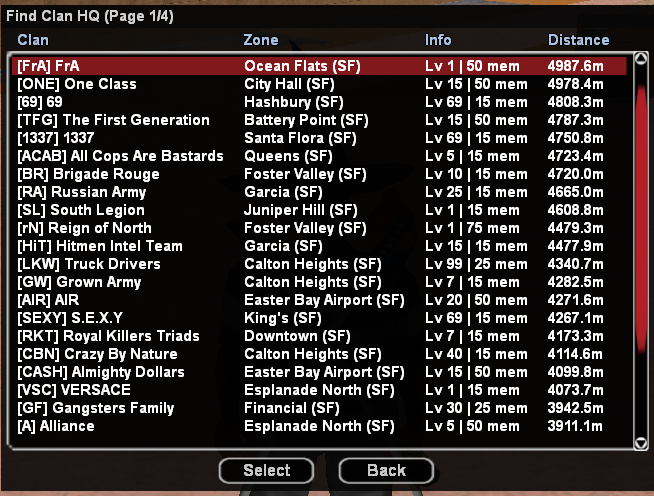
If you select the fifth item in the list, a dialog will be displayed where you will need to select the clan you want to locate.
Note: For more informations about clan hq's you need to use [/clanhqs] command
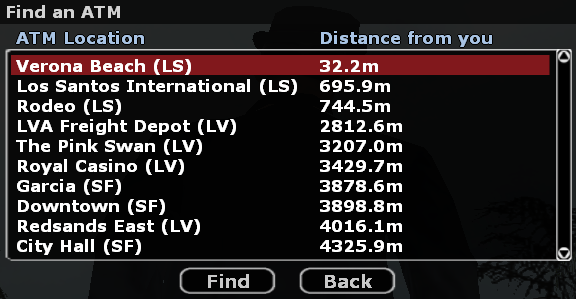
If you select the sixth item from the list, you will be shown a list of all the ATM's on the server.
If you select the seventh item from the list, you will be presented with a list of all the server's 24/7's.

If you select the eighth item from the list, you will be shown a list of all the server's gas stations.

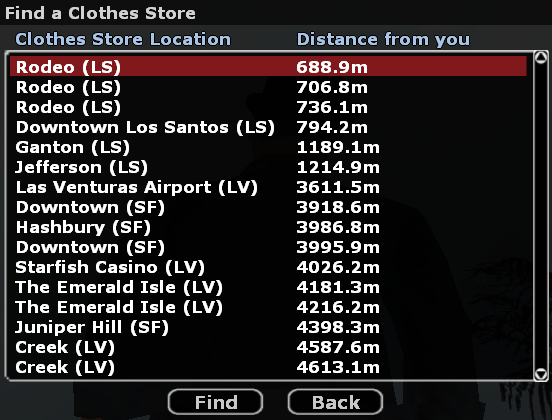
If you select the ninth item from the list, a list of all existing clothing stores on the server will be displayed.
If you select the tenth item from the list, you will be shown a list of all the existing food stores on the server.


